240fps slow motion
Speed mode records up to 240 frames per second on the wide camera for true slow motion.
The complete list of what Certus does today on iPhone, iPad and Apple Watch. 37 are marked because you won’t find them in most golf apps. One subscription includes all of it.
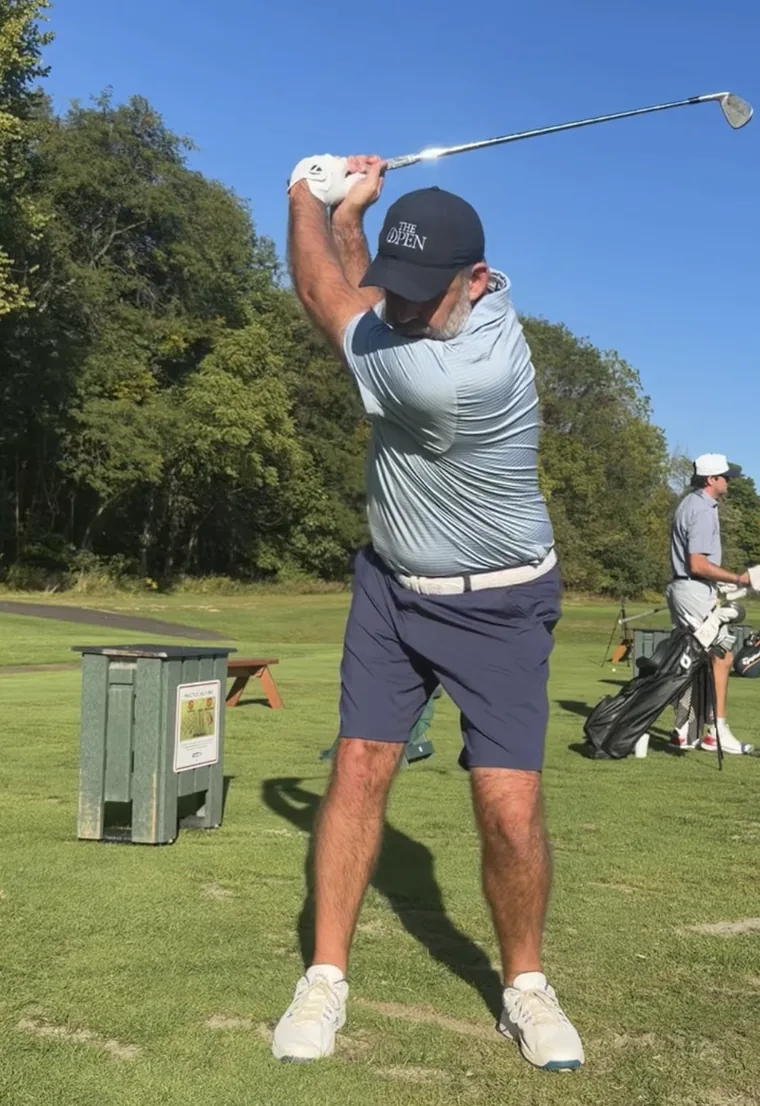
Speed mode records up to 240 frames per second on the wide camera for true slow motion.
On iPhone Pro models, 60fps video with live LiDAR depth. It’s the default on those phones.
Record one swing; it stops itself 1.5 seconds after you swing and trims the clip to the motion.
Swing continuously for up to 30 minutes; every swing is detected by motion and sound and saved as its own clip.
Pick what you want to check and Certus sets face-on or down-the-line, then talks you into frame: “Move closer.” “Full body not in frame.” Plus a silhouette and a level.
Click an AirPods stem (on the iPhone or the iPad) or tap the Watch, with a 0 to 15-second countdown before recording starts.
When heat or Low Power drops the frame rate, the badge says so and tells you why.
Shutter speed is capped for the frame rate, so the club isn’t a smear.
Pick face-on or down-the-line in the recorder and it remembers; imported clips are detected automatically, and you can change it on any clip.
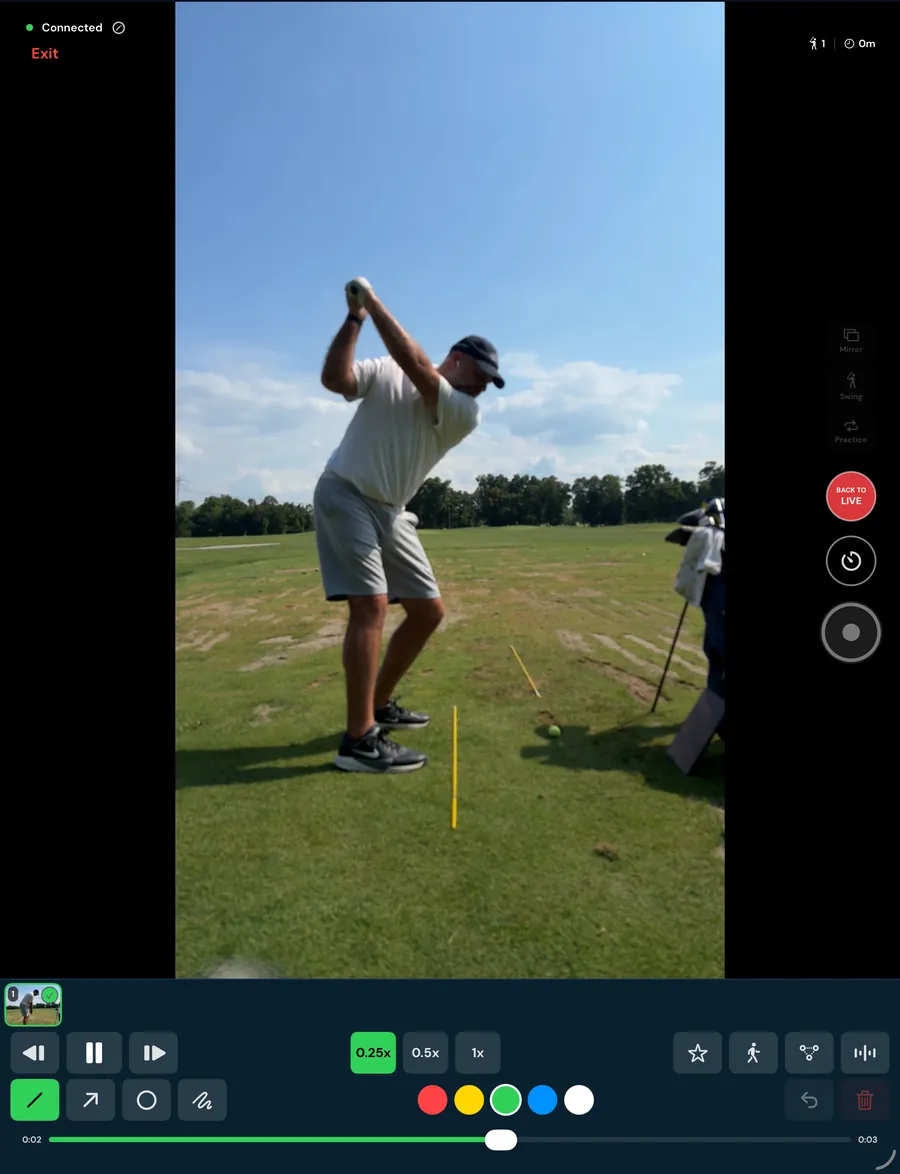
The iPhone’s camera shows on the iPad in real time, so you can watch your swing while you make it without recording anything. The link is encrypted peer-to-peer and needs no internet.
Each recorded swing lands on the iPad within seconds and starts playing on its own, slowed, on a loop.
Start and stop recording, switch between Mirror, Swing and Practice, and star swings so they save as favorites on the phone.
Draw, slow down and step frame by frame, with joints, hands and body lines analyzed on the iPad itself.
The Coach Station needs no subscription. Sign in with a subscribed Certus account, or subscribe on the iPad, and it opens the full app.
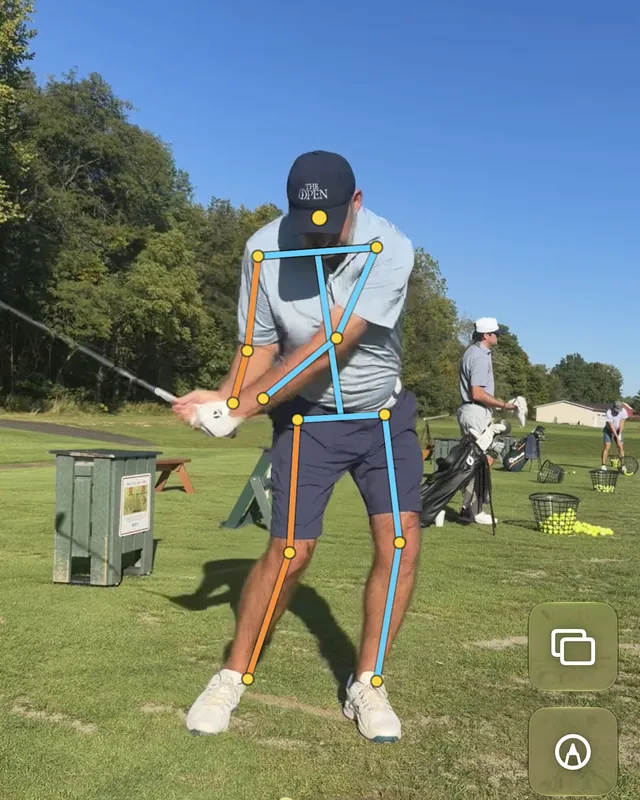
The full body tracked joint by joint through the whole swing, on-device.
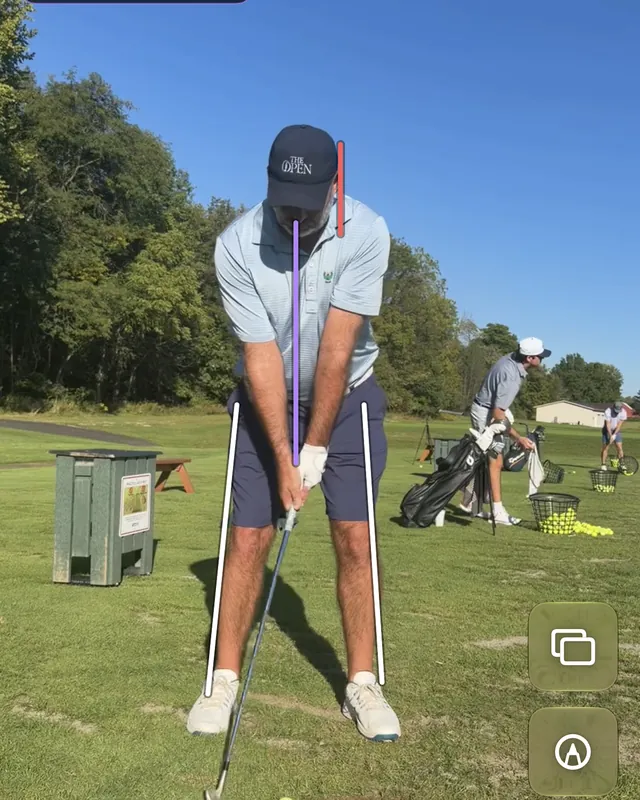
Sway, side bend, knee flex, hand depth, setup lines and more, each marked Fixed or Tracks.
Live readouts on 13 overlays, in inches or degrees, with tour ranges on the key ones. Inches appear only when LiDAR gives the clip real scale.
If the camera angle can’t see a movement, Certus shows nothing rather than a guess.
A see-through freeze of your setup laid over the moving swing, with an opacity slider.
Trace the path of the hands through the swing.
Line, arrow, circle and freehand, in color, with undo and erase.
Clips open at quarter speed. Step one frame at a time, and pinch and pan into the detail.
Cut and frame the clip before you share it.
Two swings next to each other, or overlaid; aligned at impact in one tap and fitted to the same size.
Opt-in. Tell it your usual miss and what you’re working on; get positives, the fix that matters most, drills and notes for each phase. Tap a fix to jump to its phase.
One shareable image of six key positions, address to finish.
Save the untouched original at full frame rate, or share a slowed clip with drawings burned in.
Organize every swing, filter to favorites, and import clips from Photos.
Analyzed, Scaled and LiDAR badges show at a glance what each clip can tell you.
Each swing you record is analyzed right away; Practice sessions and the backlog wait until the phone is charging. Star a clip to move it to the front.
Drill plans for driving, approach, short game, putting, the mental game and full sessions, recommended from your weaknesses.
Your swings follow you to every device you sign in on.
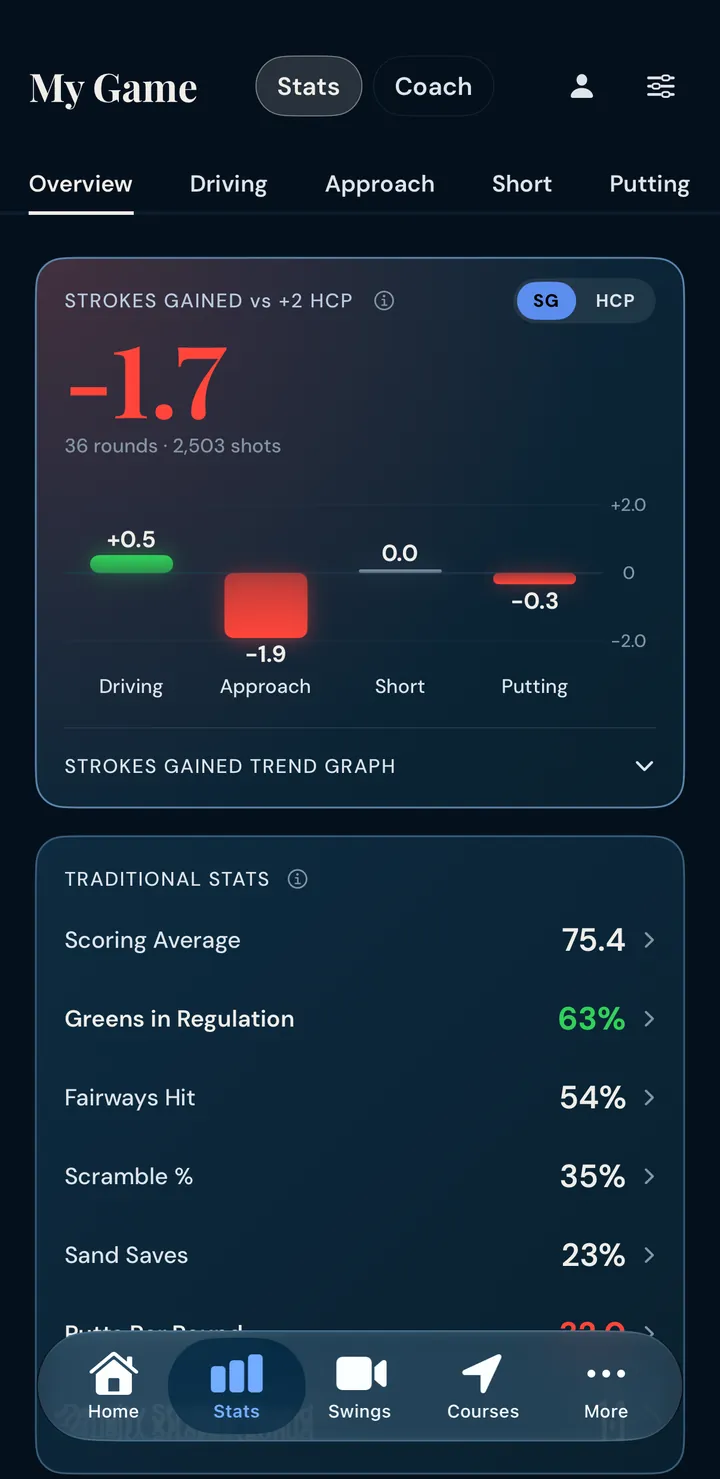
Overview, Driving, Approach, Short game and Putting.
Measure against any whole handicap from Tour (+5) to 20; on Coach, against your own best rounds too.
Flip SG to HCP and every category reads as a handicap.
A category turns green or red only when Certus is at least 80% sure; otherwise it stays neutral.
Last N rounds, date range, course, tournament or casual.
Doubles, three-putts, par-5 bogeys, bogeys inside 150 and double chips, per round.
Flag a round as competition and see tournament against casual strokes gained, category by category.
First ten rounds against last ten, or year against year; uncertain changes grayed out.
Rate your focus shot by shot and see how focused holes score against unfocused ones.
Bounce-back after bogeys, holding after birdies, and round-to-round consistency.
Lowest round, most greens, fewest putts, par-or-better and greens-in-a-row streaks, each linked to its round.
Average distance off the tee by club, accuracy map, and tee-shot trouble.
Where your approaches finish around the pin (long, short, left or right), with the average miss and the spread by distance band.
SG per shot, GIR and proximity in distance bands, filtered by lie, plus the strokes-gained curve from 55 to 250 y.
Strokes gained by where the flag was (front, back, left, right or middle), from the pins you mark.
Which irons are paying their way.
Make rate, SG per putt and three-putt rate for every distance band against your benchmark, plus the strokes-gained curve from 1 to 60 ft.
Each three-putt split into a bad lag or a missed short one.
Shots logged with a strong GPS fix and a known lie count for more.
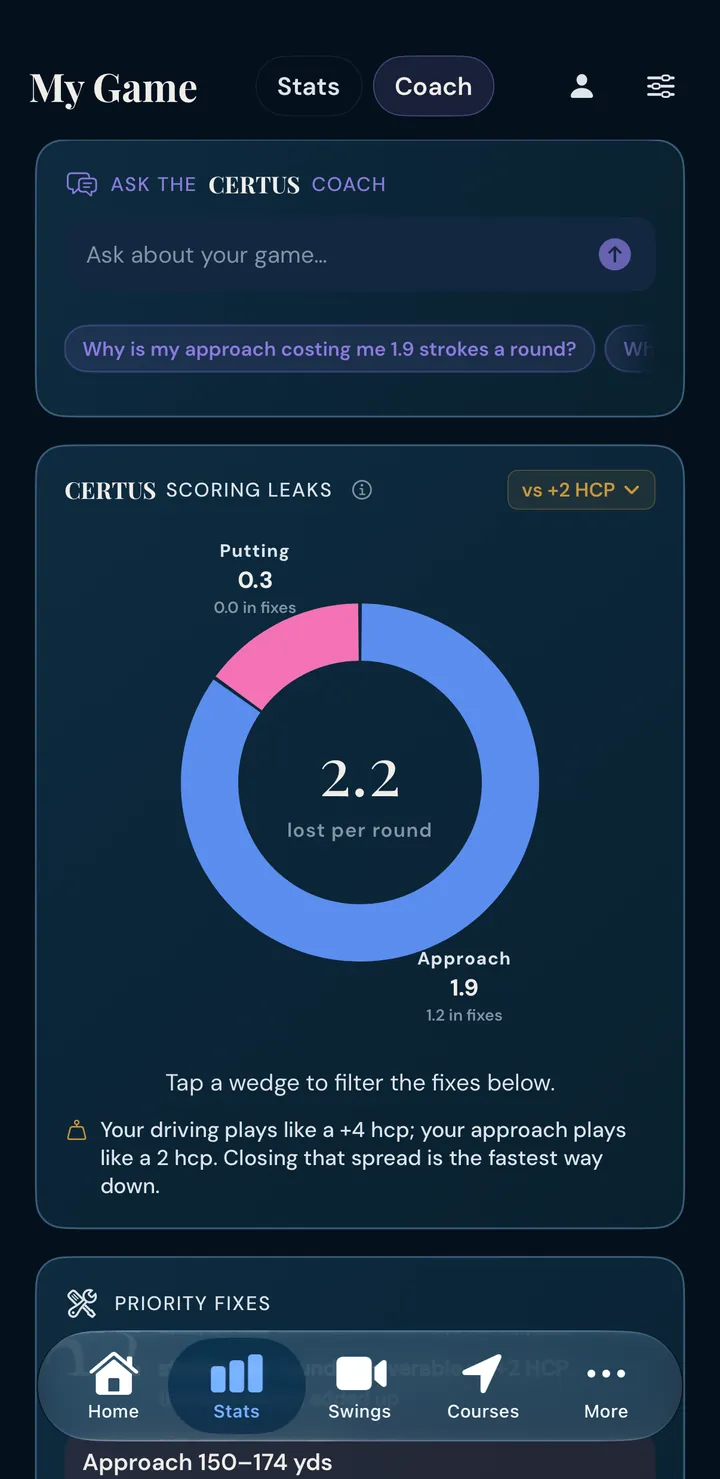
Strokes lost to the benchmark, split by category; tap a wedge to filter the fixes.
The changes worth the most strokes per round, with how often each happens and why it costs you.
Leaks that are probably real but not yet proven. They move up when the data confirms them.
Opt-in chat that answers from your own rounds, with suggested questions starting from your biggest leak.
Coach replies are checked against your computed stats; a claim the numbers don’t support is rewritten or held back.
A top-opportunity insight under each category’s strokes gained.
A written recap for every round, with your last five rounds as context.
When you’re offline, round recaps fall back to Apple’s on-device model.
Cloud AI stays off until you allow it; the consent screen says what is sent for coaching, swing review and scanning.
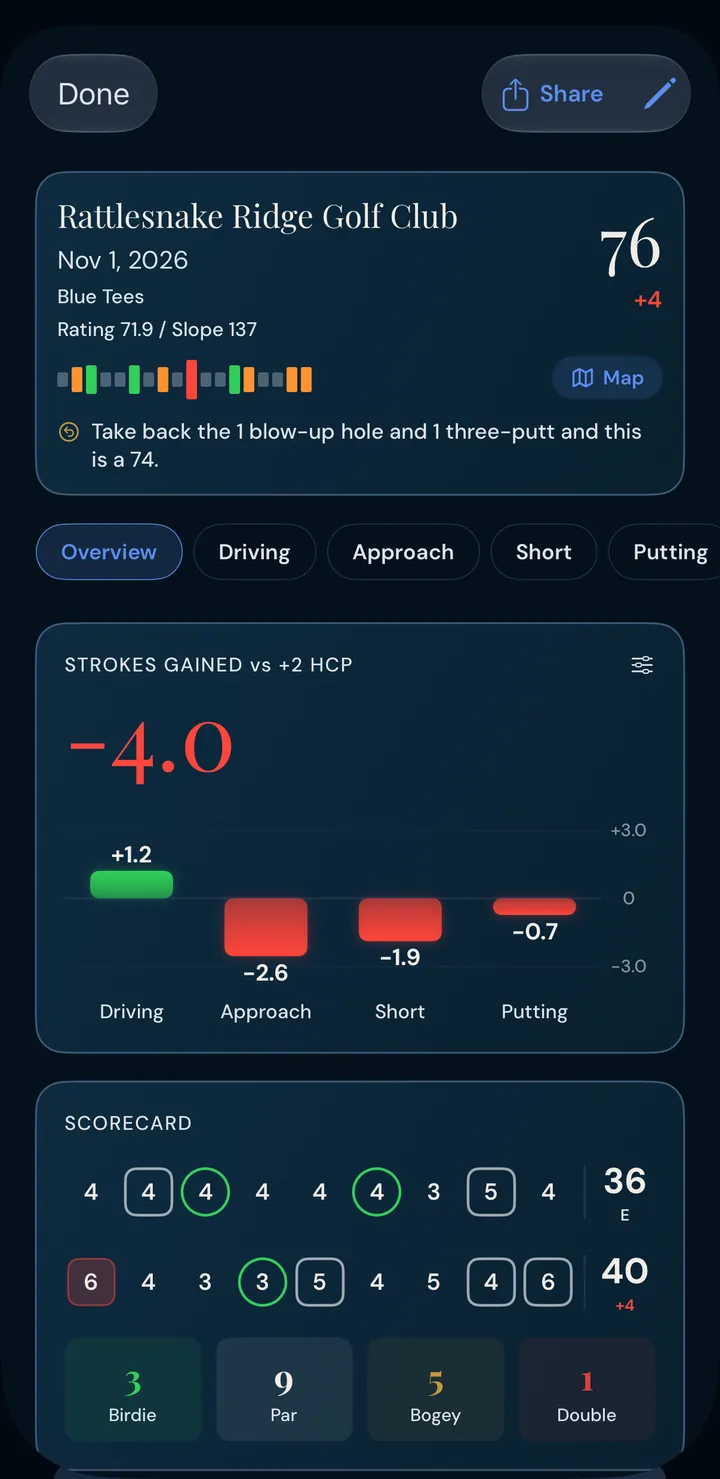
SG by category, scorecard, recap, strengths and opportunities, strokes gained hole by hole, and a map tab.
A full-screen, auto-advancing recap after you log a round on the map, ready to share; replay it from any round.
Share a round as an image or a vector PDF; roll several rounds into one summary card.
Two rounds side by side, stat by stat and hole by hole.
A handicap index from your differentials once you have three rounds; or enter your own.
Type a card in afterwards, hole by hole, with fairway and green misses.
Enter or fix a saved round shot by shot: pan the map under a crosshair to place or move a shot, with Undo.
Add or delete a shot and the hole’s score moves with it; a forgotten shot added later isn’t counted twice.
Opt-in AI reads a paper card, a Certus Shot Tracker, or screenshots from another shot-tracking app.
Print a Certus Scorecard or Shot Tracker pre-filled with your tees; it scans straight back in.
Rich-text notes with tags, folders and dictation, and a Round Log after each round.
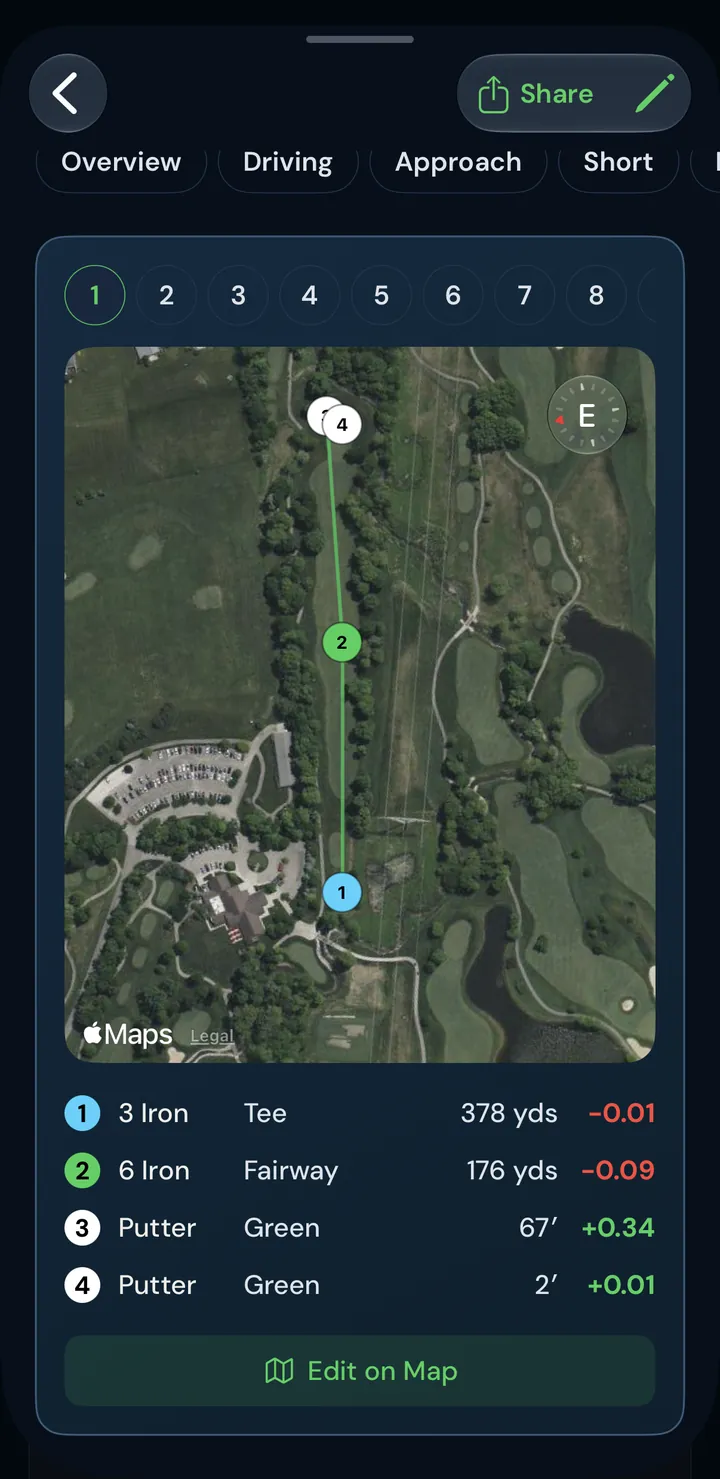
Search by name or nearby; favorites and recents work offline.
Arrive at a favorite or recent course and Certus offers to start the round.
Live distances to where your line crosses the front and back of the green, with a GPS-quality badge when the fix is weak.
A smooth camera glide down the hole that follows the dogleg.
Flat or tilted 3D satellite views with terrain, with greens, bunkers and water outlined.
Move the target anywhere and see the distance, plays-like number and club.
The aim point lands on the fairway centerline at your distance, around doglegs.
Reach and carry numbers for the bunkers and water ahead of you.
Set how wide a target you want off the tee or into the green.
Place today’s pin for exact yardages; it’s saved with the round for your pin-position stats.
Your past tee shots on this hole, each numbered with the score you made.
Private notes for each hole, saved to your account.
No map, just big numbers: back, center or pin, front, plays-like.
Pick your tees: yardages, par, rating and slope follow, and the tee marker moves to match.
Two-tee or shotgun start? Pick any hole and the round runs from there and wraps; at 27- and 36-hole clubs, choose your nines.
Download a course’s layout, tees, elevation and, if you like, green maps for play without signal.
Per-course scoring, strokes gained, strongest and weakest holes and AI insights, with a hole-by-hole PDF.
Map yardage adjusted for elevation, wind and air. Elevation is sampled along the hole from 10 m terrain data in the US (about 90 m elsewhere), never as a single tee-to-green delta.
Only the head/tail component changes distance; a tailwind helps about three-quarters as much as the same headwind hurts.
Temperature, pressure and altitude move the number the way they move the ball, with altitude counted from your home course, where your yardages were learned.
Set a tee time and each hole gets the forecast wind for when you’ll actually reach it.
Animated streaks across the hole in the wind’s true direction and strength.
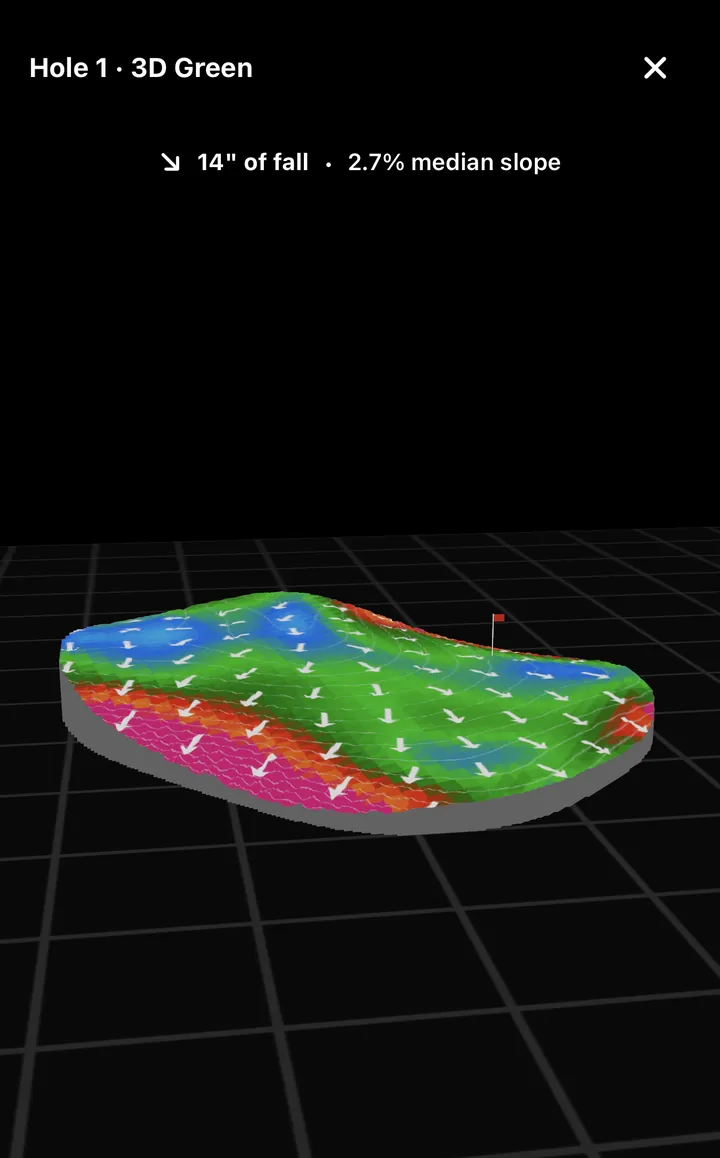
Color-coded slope and break arrows on every mapped green; 12 courses a year.
A rotatable 3D green calibrated to true inches of fall.
Tee clubs ranked by expected strokes gained from your own shots, with sample sizes shown.
Optional mode that uses your tournament rounds and flags clubs that fold under pressure.
One tap hides plays-like, wind, elevation, slope and the caddie’s club picks, keeps distances, and the T button turns solid green.
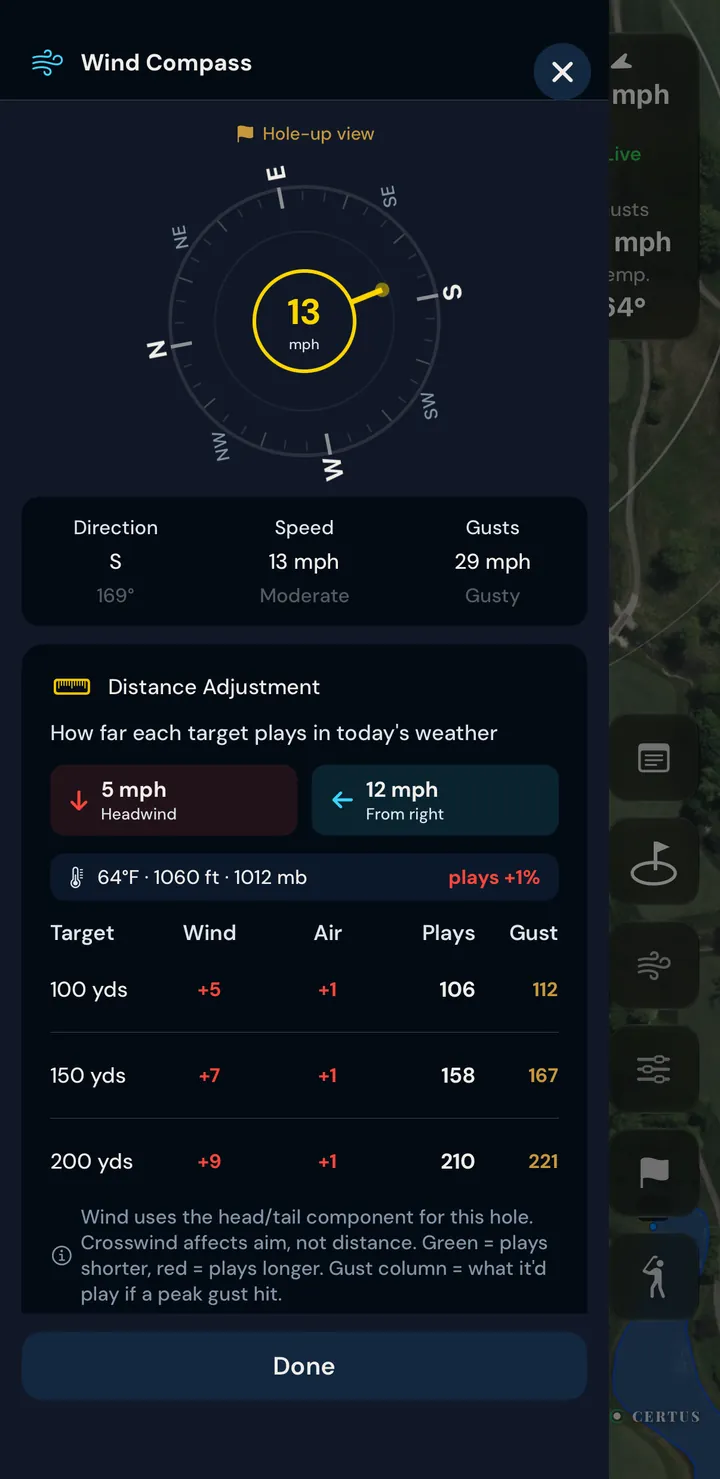
A Low, Moderate or High rating for today, tomorrow or any day in the next ten, with an outlook explaining why.
Turned so the hole points up when opened from the map: how far your shot and 100, 150 and 200 play, the gusts, and the calmest window in the hourly forecast.
Official severe-weather advisories at the top of Weather and the wind compass.
The UV index for the day or hour you pick.
Which way the wind usually blows at the course, shown with the caddie.
Without opening the app
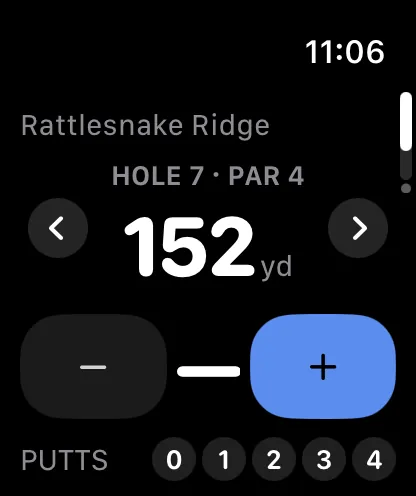
Distance to the flag on your wrist, phone in the bag.
Score, putts and fairways from the wrist; taps queue offline and sync later.
With Apple Watch, each round saves to Apple Health as a Golf workout, if you allow Health access.
The hole, your score and the yardage on the Lock Screen, with + Shot from the tee and fairway and Pin and putts on the green. The hole and score also show in the Dynamic Island.
A Log Shot control you can put on the Action button or in Control Center.
“Log a shot in Certus Golf.” “Certus Golf, I made a 5.”
A widget that jumps straight to the range, course maps or your stats.
A sidebar layout built for the bigger screen.
Yours to keep
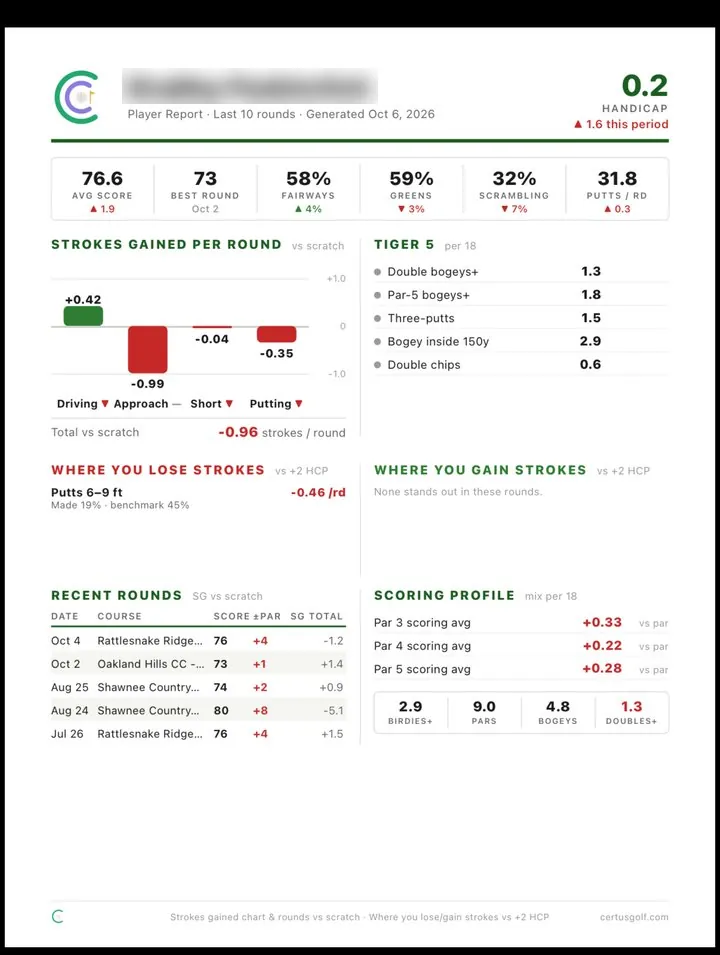
One page or detailed, for any window of rounds. The detailed report can also use rounds you pick.
Rounds, holes, every shot with its strokes gained, and journal entries.
CSV from Trackman, GCQuad, Mevo, Rapsodo and most others feeds your yardages.
Trimmed distances measured between the spots you logged, a wedge matrix, and where each club’s shots finish.
Rounds save on the phone and sync safely when you reconnect.
Including Hide My Email.
No advertising and no third-party tracking or analytics SDKs.
Delete any swing, round or entry, or your whole account, from inside the app.
VoiceOver labels, Reduce Motion support and Dynamic Type.
The same answers as the Support page, in the app, offline.
Nothing matches that search. Try “putting”, “iPad” or “wind”, or .
For iPhone, iPad and Apple Watch.